🚀 Module 1: Introduction to NetDevOps
⏱️ Estimated Duration: 90 Minutes
Learning Objectives: After this module, you will understand what NetDevOps is, why it has become indispensable for modern network teams, know the basics of VXLAN/EVPN, understand what NDFC is, and have explored your lab environment.
🤔 Part 1: Why NetDevOps? (30 Min)
Pain Points in Everyday Network Operations
Before we look at what NetDevOps is, let us ask ourselves: What is currently going wrong? Here are typical situations that probably every network engineer knows:
😫 Pain Point 1: The "Snowflake Switch"
You have 50 switches in the data center. In theory, they are all configured the same way.In theory.
In practice, Klaus "quickly adjusted something" on Switch-17 three years ago. Maria "just real quick" forgot to remove a debug command on Switch-23. And Switch-42? No idea, it just somehow works.
→ Every switch is unique like a snowflake. And just as fragile.
😫 Pain Point 2: "But it was working last week!"
It is Monday, 8 AM. The ticket system is exploding. "VPN is down." "Application XY cannot reach the database." "Internet is slow."
What happened? Who changed something over the weekend? You ask around. Nobody did it. "I didn't do anything!"
Three hours later, someone finds in an audit log: Friday night, 11:47 PM, an ACL was modified. By whom? Not listed. Why? Not listed either.
→ Changes are not traceable. Troubleshooting becomes a guessing game.
😫 Pain Point 3: The Copy-Paste Marathon
Create a new VLAN. Should take 5 minutes, right?
SSH into Switch 1. Type the commands. SSH into Switch 2. Same commands. Switch 3... Switch 4... On Switch 27, you make a typo. Switch 28... Was that Interface Eth1/1 or Eth1/11? Better check again...
4 hours later: Done. But are all switches really configured correctly?Hopefully.
→ Manual, repetitive work is error-prone and eats up time.
😫 Pain Point 4: "Rollback? What backup?"
The change went wrong. The core switch is acting up. The boss is yelling. "Undo it! Now!"
Okay, where is the backup? TFTP server? Last backup... 47 days ago. But 23 changes have been made since then...
→ No reliable rollback. Every change feels like Russian roulette.
What is NetDevOps exactly?
NetDevOps = Network + DevOps. It brings proven practices from software development into the networking world:
- Version Control: Every change is saved, like "Track Changes" in Word – only better.
- Automation: Machines do the boring, repetitive work.
- Testing: Changes are verified before they are deployed to production.
- Continuous Integration: Small, frequent changes instead of big-bang rollouts.
Analogy: The Restaurant
Imagine you are running a restaurant:
🍳 Without Recipes (= Traditional)
- • The chef cooks from memory
- • Every dish tastes different
- • If the chef is sick = chaos
- • New cook? 6 months of training
- • "The schnitzel was better last week!"
📖 With a Recipe Book (= NetDevOps)
- • Every recipe is documented
- • Consistent quality, always
- • Any cook can prepare any dish
- • New cook? Read the recipe book, get started
- • Recipe improved? Updated for everyone
Analogy: The Car Factory
Or think of a car factory:
Before the assembly line (1900): Every car was built individually by hand. A master and his apprentices. 12 hours per car. Each one unique. Expensive.
After the assembly line (Ford, 1913): Standardized steps. Documented processes. Every car is the same. 93 minutes per car. Affordable.
NetDevOps is the assembly line for network configuration. 🏭
The Traditional Way vs. NetDevOps
❌ Traditional
- • SSH into each switch individually
- • Copy-paste from Word documents
- • "That's how Klaus always did it"
- • Changes are hard to trace
- • Rollback? Backup from last week...
- • Testing? "It'll probably work..."
- • Documentation? In Klaus's head
✅ NetDevOps
- • Configuration as code in Git
- • Automated deployments
- • Documented, reviewable changes
- • Every change is traceable
- • Rollback with a single Git command
- • Automated validation
- • Code IS the documentation
📝 Part 2: Infrastructure as Code (IaC) (15 Min)
The core of NetDevOps is Infrastructure as Code (IaC). The idea is simple: Instead of entering configurations manually via a CLI or GUI, you describe the desired state in text files.
What does "as Code" mean?
When we say "as Code", we mean:
- Text files: Readable, editable, searchable
- Versioned: Stored in Git, every change traceable
- Declarative: You describe WHAT you want, not HOW
- Executable: A tool reads the file and implements it
Imperative vs. Declarative
This is an important distinction:
🔧 Imperative (traditional)
You say step by step WHAT to do:
📋 Declarative (IaC)
You describe the TARGET STATE:
The tool takes care of the rest.
Benefits of IaC
✨ Why IaC Makes Your Life Better
- 🔄 Reproducible: Same code = Same result. Always. Everywhere.
- 📜 Documented: The code IS the documentation. No more outdated Word documents.
- 🔍 Reviewable: Colleagues can review changes BEFORE they go live.
- ⏪ Rollback: Something broken?
git revertand done. - 🧪 Testable: Syntax check, validation, dry-run – all automated.
- 📈 Scalable: 1 switch or 1000 – the effort is the same.
A Concrete Example
This is what Infrastructure as Code looks like for a VXLAN fabric:
# Infrastructure as Code - VXLAN Fabric Definition
# This file describes the TARGET STATE of our fabric
fabric:
name: FI-DataCenter-Prod
fabric_type: vxlan_evpn
# BGP configuration
bgp:
asn: 65001
# Underlay network
underlay:
protocol: ospf
area: 0.0.0.0
network: 10.0.0.0/8
# Spine switches
spines:
- name: dc1-spine-1
management_ip: 10.1.1.1
loopback: 10.255.1.1
role: spine
- name: dc1-spine-2
management_ip: 10.1.1.2
loopback: 10.255.1.2
role: spine
# Leaf switches
leaves:
- name: dc1-leaf-1
management_ip: 10.1.2.1
loopback: 10.255.2.1
role: leaf
uplinks:
- spine: dc1-spine-1
interface: Eth1/49
- spine: dc1-spine-2
interface: Eth1/50
- name: dc1-leaf-2
management_ip: 10.1.2.2
loopback: 10.255.2.2
role: leaf
uplinks:
- spine: dc1-spine-1
interface: Eth1/49
- spine: dc1-spine-2
interface: Eth1/50
# VRFs and networks are defined in separate files
# See: networks/ folderThis file is readable, versionable, and states exactly how the fabric should look. No ambiguity, no "only Klaus knows that" moments.
🌐 Part 3: VXLAN/EVPN Basics (15 Min)
Before we do VXLAN as Code, we should understand WHAT VXLAN and EVPN actually are. Don't worry, we will keep it understandable – no RFC recitation!
The Problem: VLANs Don't Scale
Classic VLANs have a problem: They only exist at Layer 2 and are limited to 4096 (12-bit VLAN ID). In modern data centers with virtualization, multi-tenancy, and cloud requirements, that is no longer enough.
🤔 The VLAN Dilemma
- • Max. 4096 VLANs (often fewer usable)
- • Spanning Tree = slow convergence, blocked paths
- • Layer 2 broadcast domains become huge and slow
- • Difficult to stretch across multiple data centers
The Solution: VXLAN
VXLAN (Virtual Extensible LAN) solves these problems by encapsulating Layer 2 frames in UDP packets and tunneling them over a Layer 3 network.
📦 VXLAN in One Minute
- VNI (VXLAN Network Identifier): 24 bits = 16 million possible networks instead of just 4096
- VTEP (VXLAN Tunnel Endpoint): The switch that encapsulates and decapsulates the packets
- Overlay: The virtual Layer 2 network that sits on top of everything
- Underlay: The physical Layer 3 network underneath (IP routing)
Analogy: The Postal Service
Imagine you want to send a letter from Munich to Hamburg, but you can only communicate within your office building (Layer 2):
Without VXLAN: You would have to build a private pneumatic tube from Munich to Hamburg. Expensive, inflexible.
With VXLAN: You put your letter (Layer 2 frame) in an envelope (UDP packet) and send it via postal service (IP network). At the destination, it gets unwrapped and delivered. Done!
What is EVPN?
EVPN (Ethernet VPN) is the "Control Plane" for VXLAN. It determines WHO can talk to WHOM and WHERE the MAC addresses are.
EVPN = How the switches learn which MAC addresses are where (Control Plane).
Together they form VXLAN/EVPN – the standard for modern datacenter fabrics.
EVPN Benefits
- No Flooding: Instead of flooding broadcasts, switches exchange information via BGP
- Fast Convergence: BGP is fast and stable
- Multi-Homing: A server can be connected to multiple switches (active/active)
- Layer 2 + Layer 3: EVPN can do both – distribute MAC addresses AND IP routes
VXLAN Fabric Topology
🏗️ Spine-Leaf Architecture
                    ┌─────────────┐     ┌─────────────┐
                    │   SPINE-1   │     │   SPINE-2   │
                    │  (BGP RR)   │     │  (BGP RR)   │
                    └──────┬──────┘     └──────┬──────┘
                           │                   │
           ┌───────────────┼───────────────────┼───────────────┐
           │               │                   │               │
     ┌─────┴─────┐   ┌─────┴─────┐       ┌─────┴─────┐   ┌─────┴─────┐
     │  LEAF-1   │   │  LEAF-2   │       │  LEAF-3   │   │  LEAF-4   │
     │  (VTEP)   │   │  (VTEP)   │       │  (VTEP)   │   │  (VTEP)   │
     └─────┬─────┘   └─────┬─────┘       └─────┬─────┘   └─────┬─────┘
           │               │                   │               │
        Server          Server              Server          Server
- • Spines: Connect all leafs, only do routing (no storage/servers)
- • Leafs: This is where servers, storage, firewalls connect – the VTEPs
- • Every leaf is connected to every spine = maximum redundancy
🧪 What is Cisco Modeling Labs (CML)?
Cisco Modeling Labs (CML) is a network simulation environment from Cisco where you can build and test virtual network topologies. CML allows you to run real Cisco images (NX-OS, IOS-XE, etc.) in a virtual environment – perfect for lab environments and testing before production deployment.
In our workshop, we use CML to simulate a VXLAN/EVPN fabric with Nexus switches. The lab "FI - VXLAN as Code Workshop" contains a complete spine-leaf topology with 2 spines and 2 leafs that we will manage via NDFC and configure through code.
⚠️ Important: The lab must be powered on first!
The lab "FI - VXLAN as Code Workshop" is turned off by default. You need to start it (Start Lab) in CML before the switches are reachable. Booting up may take a few minutes – wait until all nodes are green.
Benefit: You can safely experiment, test configurations, and simply reset the lab if something goes wrong – without risking real hardware.
📊 Part 4: Nexus Dashboard & NDFC (10 Min)
Now we know WHAT VXLAN/EVPN is. But how do you configure that on 50 switches? This is where Nexus Dashboard comes in.
What is Nexus Dashboard?
Nexus Dashboard is Cisco's central management platform for datacenter networks. It is like the cockpit for your entire fabric.
🎛️ Nexus Dashboard at a Glance
- Centralized Management: All switches from a single interface
- Fabric Controller (NDFC): Automates VXLAN/EVPN deployments
- Insights: Monitoring, troubleshooting, compliance checks
- Orchestrator: Multi-site connection of multiple fabrics
What is NDFC?
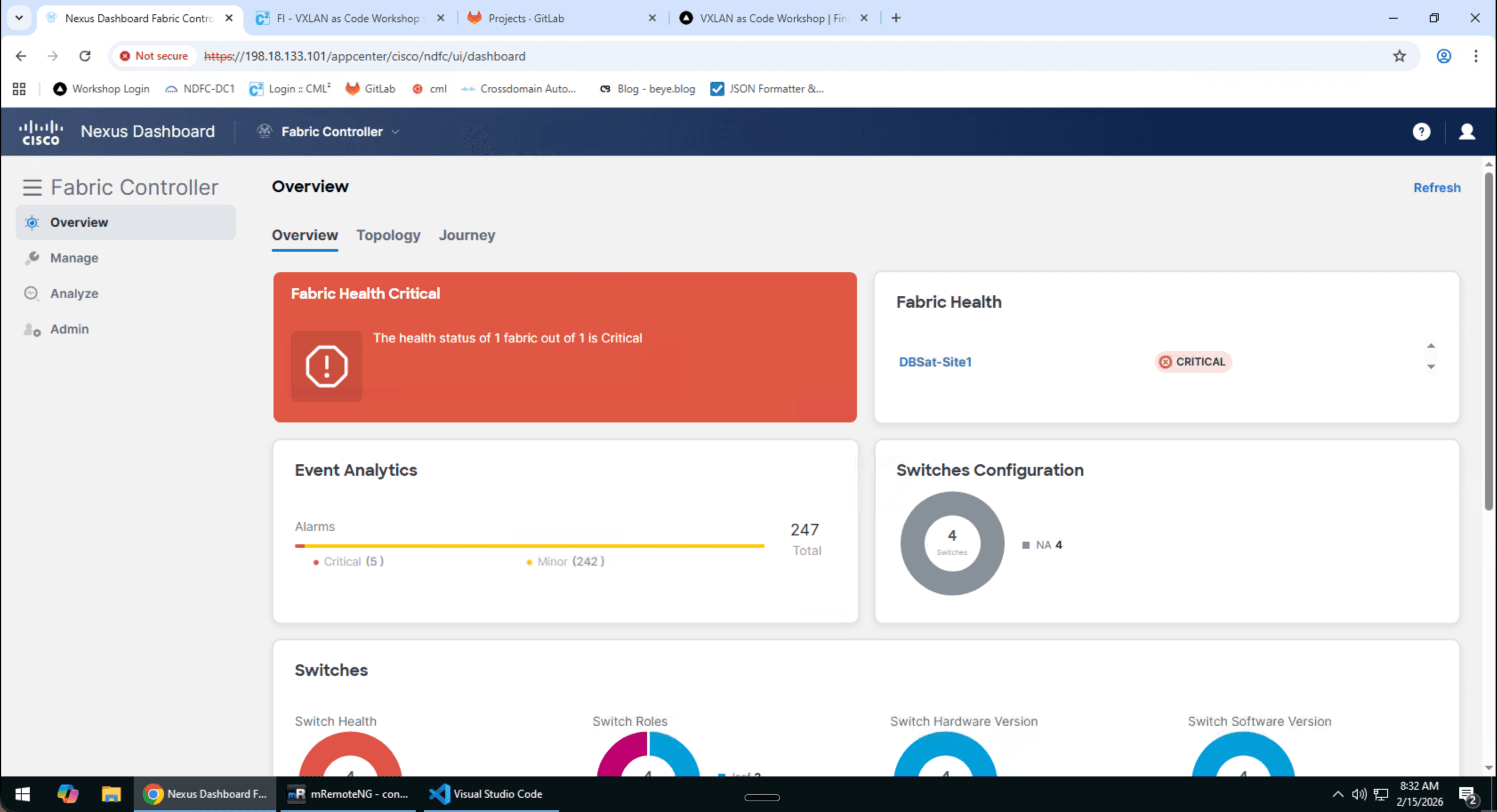
NDFC (Nexus Dashboard Fabric Controller) – formerly DCNM (Data Center Network Manager) – is THE component for us. NDFC:
- Knows all switches and their connections
- Generates the complete VXLAN/EVPN configuration
- Pushes configs to the switches
- Shows the current status of the fabric
- Provides a REST API for automation (👈 That is what we use!)
The Workflow with NDFC
NDFC is the bridge between our code and the switches.
🔬 Part 5: Hands-on Exercises (15 Min)
Enough theory! Time to get your hands dirty. In the following exercises, you will explore your lab environment.
🧪 Exercise 1: Explore the Lab Environment (5 Min)
Your lab environment runs in the Cisco Cloud. Follow these steps to access your personal environment:
- Log in at dcloud.cisco.com
- Click on "My Hub"
- Select "Sessions"
- Click "View" on your assigned session
- Open the WebRDP connection to connect via Remote Desktop to the Windows machine running in the browser
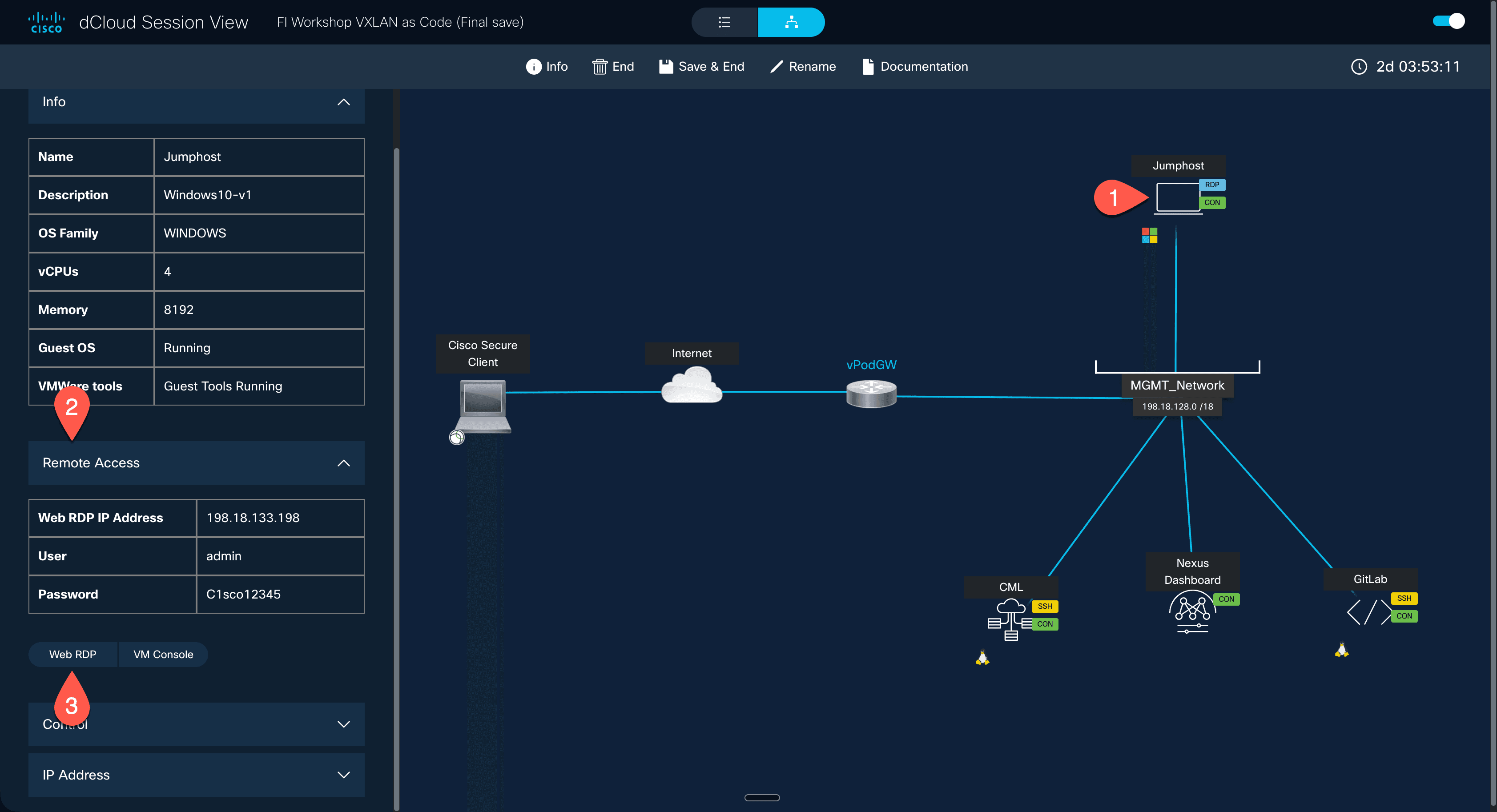
On the Windows machine, you have access to all lab components. Open the following services in separate browser tabs:
VS Code is installed locally on the desktop. Launch it via the desktop icon.
→ This is where we write and edit our code
URL: https://198.18.133.100/
Username: root
Password: C1sco12345→ This is where we version our code and trigger pipelines
URL: https://198.18.133.101/
Username: admin
Password: C1sco12345→ This is where we see our fabric and what has been deployed
URL: https://198.18.134.1/
Username: admin
Password: C1sco12345
Lab Name: FI - VXLAN as Code Workshop→ This is where our simulated VXLAN/EVPN fabric with Nexus switches runs
⚠️ Important: The lab "FI - VXLAN as Code Workshop" must be started first! Click on the lab and then on "Start Lab". Booting up takes a few minutes — wait until all nodes are green.
| Switch | IP | Username | Password |
|---|---|---|---|
| spine01 | 198.18.1.181 | ndfc | C1sco12345 |
| leaf01 | 198.18.1.182 | ndfc | C1sco12345 |
| spine02 | 198.18.1.183 | ndfc | C1sco12345 |
| leaf02 | 198.18.1.184 | ndfc | C1sco12345 |
💡 You can use mRemoteNG to access the switches via CLI, or use the Terminal directly in CML.
- ☐ VS Code is open and showing the project
- ☐ GitLab shows the repository
- ☐ NDFC login works
- ☐ CML is reachable and the lab is running
- ☐ Switch access tested via mRemoteNG or CML Terminal
🧪 Exercise 2: Explore NDFC (5 Min)
Navigate through NDFC and answer the following questions:
- Click on Fabric Controller on the left
- Select Fabrics from the menu
- Open the fabric
DBSat-Site1 - Take a look at the topology view
- • How many switches are in the fabric?
- • What roles do the switches have (Spine/Leaf)?
- • Is the fabric currently "In-Sync" or "Out-of-Sync"?
- • Are there already VRFs or Networks configured?
🧪 Exercise 3: Group Discussion (5 Min)
Discuss with your neighbors:
"What manual, repetitive tasks do you do in your daily or weekly network operations?"
Examples to get started:
- • Creating VLANs on multiple switches
- • Port configurations for new servers
- • Making ACL changes
- • Creating backup configurations
- • Updating documentation
Write down 2-3 tasks that you would like to automate. At the end of the workshop, we will check if we have found solutions for them!
❓ Part 6: Quiz & Reflection (5 Min)
Test your knowledge! Try to answer the questions without scrolling back.
1. What does "NetDevOps" mean?
Show Answer
NetDevOps = Network + DevOps. It brings software development practices (version control, automation, testing, CI/CD) into the networking world.
2. What is the difference between imperative and declarative?
Show Answer
Imperative: Step-by-step instructions (HOW something is done).
Declarative: Description of the target state (WHAT the result should be).
3. What does VNI stand for and how many VNIs are possible?
Show Answer
VNI = VXLAN Network Identifier. With 24 bits, approximately 16 million VNIs are possible (vs. only 4096 VLANs with 12 bits).
4. What is a VTEP?
Show Answer
VTEP = VXLAN Tunnel Endpoint. This is the switch that encapsulates and decapsulates Layer 2 frames into VXLAN packets. In a spine-leaf fabric, the leafs are the VTEPs.
5. What does NDFC do?
Show Answer
NDFC (Nexus Dashboard Fabric Controller) is the central management platform for VXLAN/EVPN fabrics. It knows all switches, generates configurations, pushes them to the devices, and provides a REST API for automation.
🎯 Reflection
Think for a moment: Which of the four pain points from the beginning (snowflake switches, lack of traceability, copy-paste marathon, no rollback) affects you the most? Keep that in mind – by the end of the workshop, that should be solved!
📋 Summary
✅ What You Learned in This Module
- ☑️ Why NetDevOps: The pain points of traditional network management
- ☑️ What NetDevOps is: DevOps practices for networks (versioning, automation, testing)
- ☑️ Infrastructure as Code: Declarative configuration in text files instead of manual CLI commands
- ☑️ VXLAN/EVPN: Modern overlay network for scalable data centers
- ☑️ Nexus Dashboard & NDFC: The central control for your fabric
- ☑️ Your Lab Environment: VS Code, GitLab, and NDFC are ready to go
🔮 Preview: What's Next?
In the next module, you will learn about Git – the backbone of every NetDevOps implementation. You will see how to version changes, trace them, and roll them back when needed. Don't worry, it is easier than it looks!